“Free voice cloning online” usually means one of two things: a cloud service with a small free trial, or a tool that is actually free to use. Easy Voice Clone is the second kind. It is free because it works differently. The AI model runs inside your web browser, on your own computer or phone, so there are no GPU servers to pay for and your recordings never have to be uploaded.
What you can do for free
| Without an account | Free account | |
|---|---|---|
| Clone a voice from a 10–20 second sample | Yes | Yes |
| Characters per generation | 2,000 | 5,000 |
| Languages | English | English, Spanish, German, Italian, Portuguese |
| Saved cloned voices | A few | Up to 50 |
| WAV download, no watermark | Yes | Yes |
| Price | $0 | $0 |
There is no daily limit on the number of generations. The character limit applies to each generation, so a longer script is simply generated in parts.
How online voice cloning works here
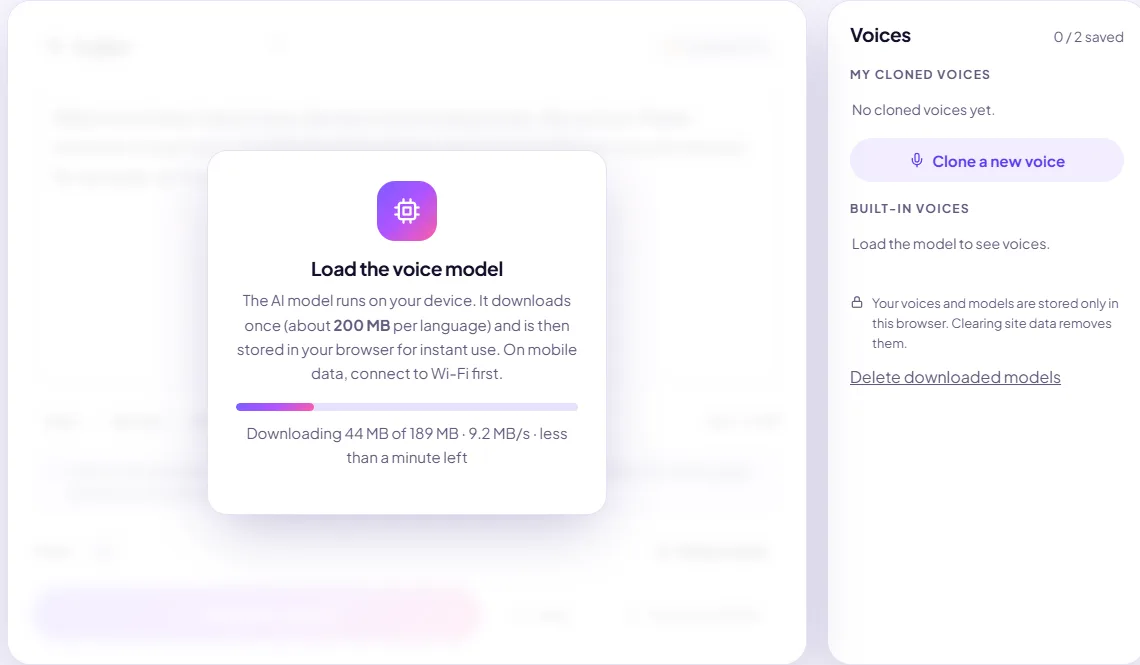
- The model downloads once. When you press Load model, your browser downloads the voice model (about 200 MB per language) and stores it. Later visits load it from your device in a few seconds, even offline.
- You provide a voice sample. Record 10–20 seconds with your microphone or upload a WAV, MP3, M4A or OGG clip. The sample is analysed on your device and turned into a compact voice profile.
- You type, it speaks. The model generates speech sentence by sentence in the cloned voice. Playback starts after about a second while the rest is generated.
- You download a WAV. The result is a 24 kHz, 16-bit mono WAV file you can drop into any video or audio editor.
Browser-based vs cloud voice cloning
| Easy Voice Clone (in your browser) | Typical cloud voice cloner | |
|---|---|---|
| Where your recording goes | Stays on your device | Uploaded to the provider's servers |
| Cost | Free | Free trial, then a subscription or per-character credits |
| First use | One-time ~200 MB download | Instant, but needs an account |
| Speed | Depends on your device; most laptops are faster than real time | Depends on server load and queue |
| Works offline | Yes, once the model is cached | No |
| Languages and emotion controls | 5 languages; style follows your sample | Often more languages and fine-grained controls |
If you need dozens of languages or detailed emotion controls, a paid cloud service may fit better. If you want a free, private clone of your own voice for narration, voice-overs and corrections, browser-based cloning is hard to beat.
What you need
- A recent browser: Chrome, Edge, Firefox or Safari, updated within the last year or so.
- About 200 MB of free storage per language, so the browser can keep the model.
- A decent connection for the first load. On fast Wi-Fi it takes well under a minute; on slow mobile data it can take several minutes. If the download is interrupted, it retries automatically and keeps the parts already downloaded.
- A microphone, or an existing clean recording of your voice.
Laptops and desktops give the fastest results. Recent phones work too, but generation is slower and older phones with little memory may struggle to start the model. If that happens, close other apps or use a computer.
What it is good at, and what it isn't
- Good at: narration and voice-overs in your own voice, fixing a single flubbed line, drafts, course material, accessibility read-outs and keeping a consistent voice across videos.
- Not designed for: singing, precise emotional direction, long passages that need a live performer's energy, or languages other than the five listed above.
Whose voice you can clone
Clone your own voice, or a voice whose owner has given you explicit permission. Every clone in the Studio requires you to confirm this. Never use a clone to deceive, impersonate or defraud anyone, and say when published audio was generated with AI. See privacy and consent.
Start here
New to voice cloning? Read how to clone your voice for a click-by-click walkthrough, then the voice sample recording guide to get the best possible quality from your first clone.